Ir a la información del producto
1 de 15

Rowsfire

Rowsfire A105 A320 Radio & ATC Panel (RMP) — Backlit

🔥10% Off: $224.99, Build Your A320 Cockpit

Precio regular
$249.99 USD
Precio regular
Precio de venta
$249.99 USD

Free Worldwide Shipping

30-Day Return & Exchange

1-Year Warranty

    Rowsfire A105 All-in-One RMP+ATC Panel-V3.1 - Rowsfire
    Rowsfire A105 All-in-One RMP+ATC Panel-V3.1 - Rowsfire
    Rowsfire A105 All-in-One RMP+ATC Panel-V3.1 - Rowsfire
    Rowsfire A105 All-in-One RMP+ATC Panel-V3.1 - Rowsfire
    Rowsfire A105 All-in-One RMP+ATC Panel-V3.1 - Rowsfire
    Rowsfire A105 All-in-One RMP+ATC Panel-V3.1 - Rowsfire
    Rowsfire A105 All-in-One RMP+ATC Panel-V3.1 - Rowsfire
    Rowsfire A105 All-in-One RMP+ATC Panel-V3.1 - Rowsfire
    Rowsfire A105 All-in-One RMP+ATC Panel-V3.1 - Rowsfire
    Rowsfire A105 All-in-One RMP+ATC Panel-V3.1 - Rowsfire
    Rowsfire A105 All-in-One RMP+ATC Panel-V3.1 - Rowsfire
    Rowsfire A105 All-in-One RMP+ATC Panel-V3.1 - Rowsfire
    Rowsfire A105 All-in-One RMP+ATC Panel-V3.1 - Rowsfire
    Rowsfire A105 All-in-One RMP+ATC Panel-V3.1 - Rowsfire
    Rowsfire A105 All-in-One RMP+ATC Panel-V3.1 - Rowsfire
    Airbus A320 RMP + ATC Panel · V3.1

    Radio and transponder, all on one backlit panel.

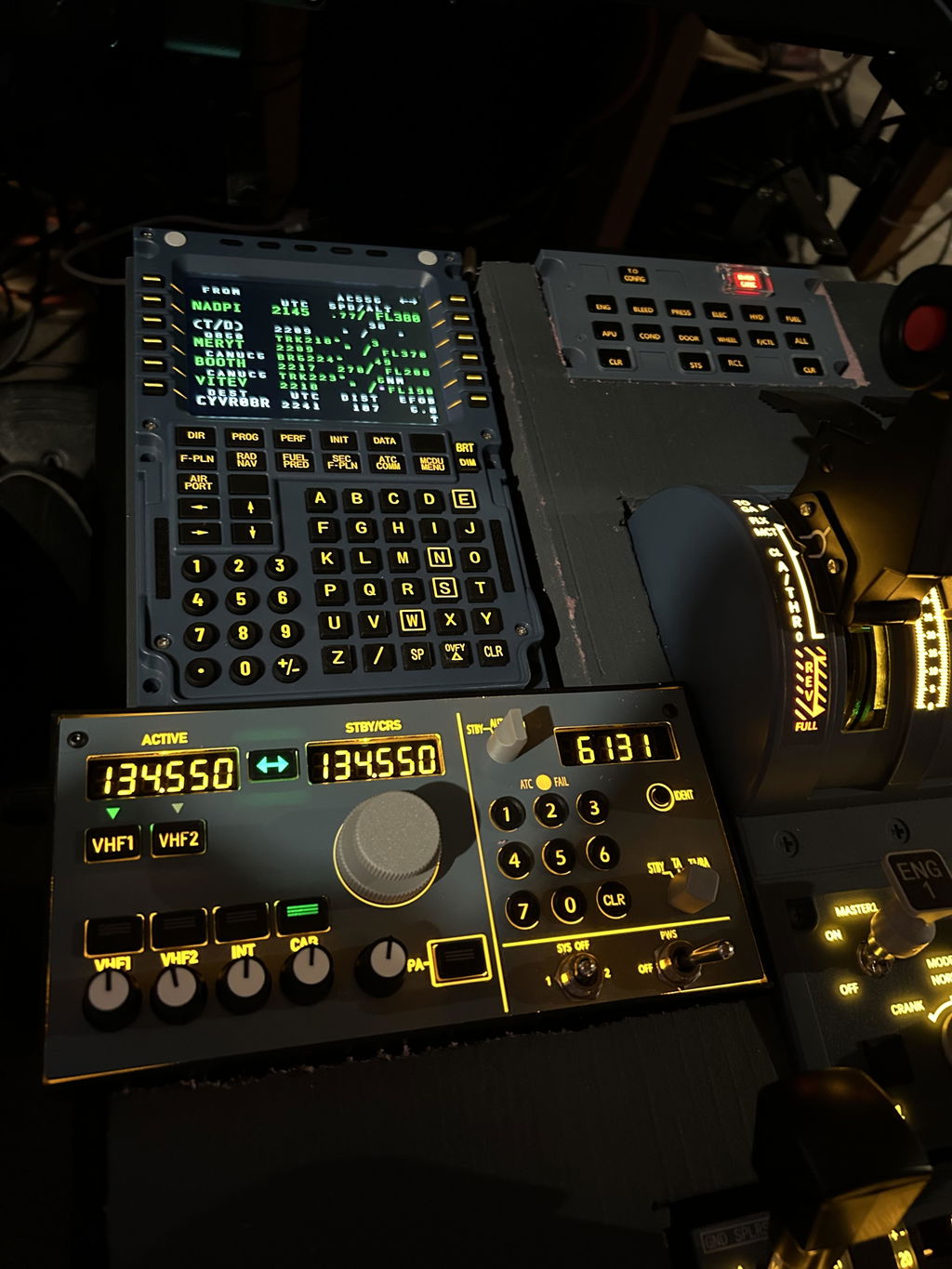
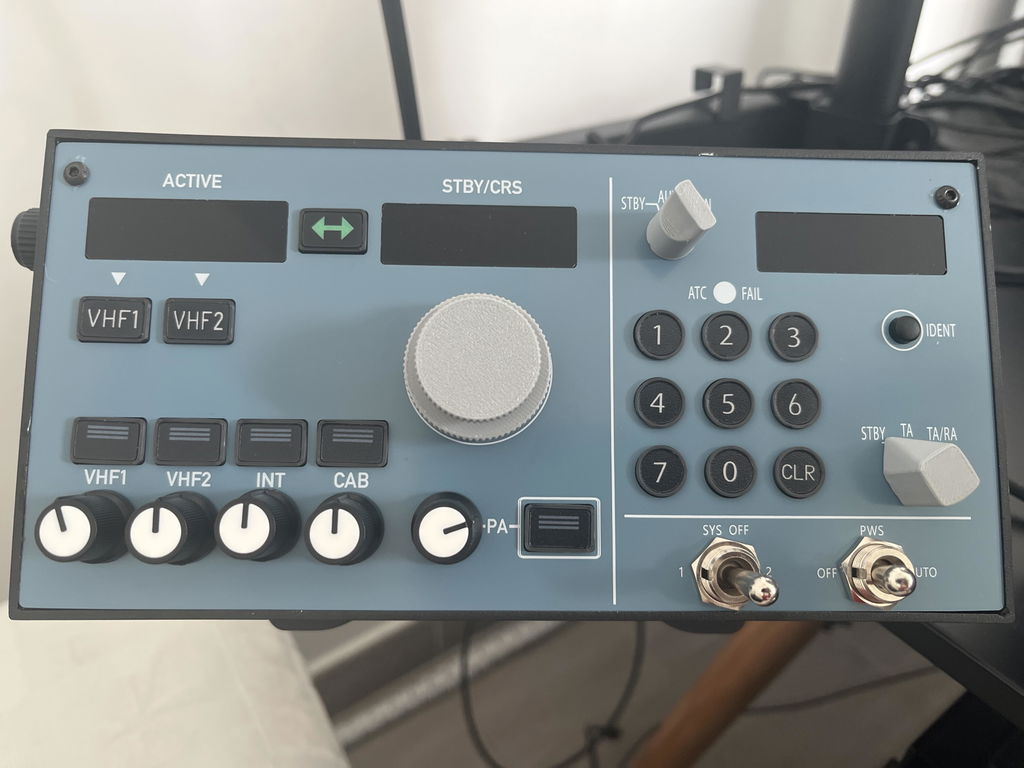
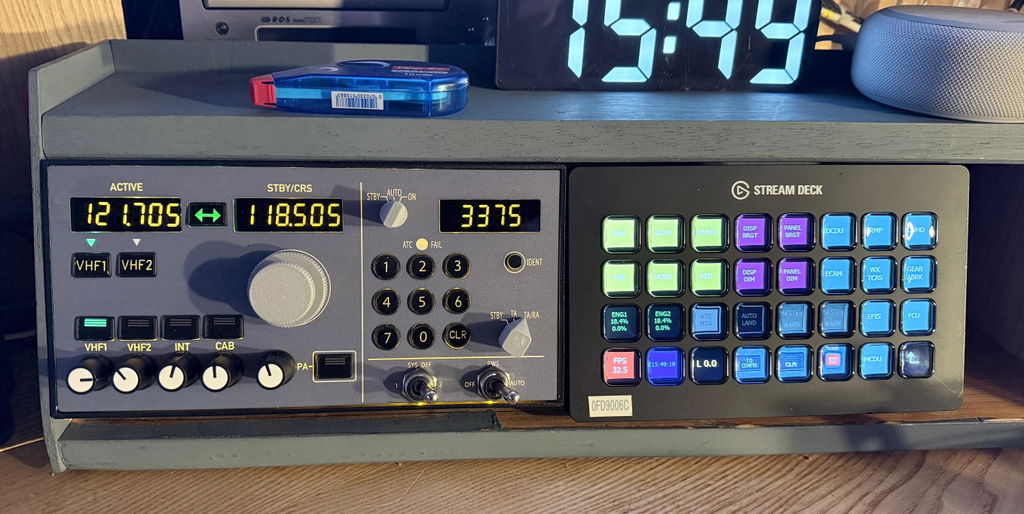
    The Rowsfire A105 is an all-in-one RMP + ATC panel for the Airbus A320 — combining the radio management panel and transponder into a single backlit unit with authentic buttons and toggle switches. Built for MSFS 2020/2024 and X-Plane 12, it connects directly through the Rowsfire App (Fenix, FlyByWire A32NX, ToLiss & FSLabs). The V3.1 edition adds synchronized lighting linked to your aircraft model.

    All-in-one RMP + ATC V3.1 lighting sync Backlit · aluminum frame 75×75 VESA Type-C · cable included
    🚚Free Worldwide Shipping
    ↩️30-Day Return & Exchange
    🛡️1-Year Warranty
    💬Real Human Support
    Video

    See the A105 in action.

    Features

    Two panels in one.

    A105 all-in-one RMP + ATC panel with backlit buttons

    📻 All-in-one radio & frequency panel

    A combined RMP + ATC panel with authentic backlit buttons and toggle switches — radio management and transponder in one compact unit. The production version includes larger, upgraded switches compared to the sample images shown.

    🧱 Premium build quality

    Crafted with a stable SMD PCB board and a sturdy aluminum alloy frame for a solid, high-end feel. Equipped with a rear USB port and a 75×75mm VESA mount for easy expansion. Dimensions 21×10.5×3cm; data cable included.

    A105 panel — aluminum frame and SMD PCB build
    A105 panel — Rowsfire App plug and play

    🔧 Plug & play — Rowsfire App or Mobiflight

    Connect the easy way with the Rowsfire App — it auto-detects your hardware and auto-loads the config, so you're connected and flying in under 60 seconds, with no manual setup. Prefer Mobiflight? Fully supported too, with tutorials provided.

    ✈️ Wide aircraft & sim compatibility

    Works with MSFS 2020/2024 and X-Plane 12. Supports mainstream A320-family aircraft: Fenix A320, FlyByWire A32NX, ToLiss A319/A320/A321 and FSLabs A321. More model support is added through ongoing App updates.

    A105 panel — wide aircraft compatibility
    A105 panel — V3.1 synchronized lighting

    💡 Upgraded V3.1 with lighting sync

    This third-generation version includes synchronized lighting effects, fully linked with aircraft models. Enjoy adjustable and switchable lighting for a more realistic and immersive flight-simulation experience.

    Up close

    Every detail.

    A105 panel — detail 1
    A105 panel — detail 2
    A105 panel — detail 3
    A105 panel — detail 4
    A105 panel — detail 5
    A105 panel — detail 6
    Compatibility

    Works with your Airbus.

    Aircraft & add-ons

    • Fenix A320
    • FlyByWire A32NX
    • ToLiss A319 / A320 / A321
    • FSLabs A321
    • More added via ongoing App updates

    Simulators & connection

    • MSFS 2020 & 2024 · X-Plane 12
    • Rowsfire App — connect in under 60s
    • Auto-detect + auto-load (or Mobiflight)
    • Rear USB · 75×75mm VESA mount
    Setup

    Set it up once, then just fly.

    ⚙️ Quick start: download the Rowsfire App and connect directly — no Mobiflight required. It auto-detects your hardware and auto-loads the config, so you're connected and flying in under 60 seconds; just launch the App and simulator. Prefer Mobiflight? It's fully supported too, with tutorials provided.

    📸 Note on images: the production version ships with larger, upgraded switches compared to the sample images shown here.
    Specs

    The technical details.

    PanelAll-in-One RMP + ATC (Radio & Transponder)
    EditionV3.1 — backlit, with lighting sync
    Compatible simulatorsMSFS 2020 / 2024 · X-Plane 12 (Windows 10 / 11)
    Compatible aircraftFenix A320 · FlyByWire A32NX · ToLiss A319/A320/A321 · FSLabs A321
    MaterialAluminum alloy + acrylic + electronic components
    Mounting75 × 75 mm VESA mount
    ConnectionRear USB · Type-C cable (included)
    DriverRowsfire App (auto-detect + auto-load) or Mobiflight
    Product weight500 g
    Package weight800 g
    Product dimensions21 × 10.5 × 3 cm
    Package dimensions25 × 18 × 8.5 cm
    PackingGraphic carton
    Age16+
    In the box

    What's included.

    • RMP + ATC Panel × 1
    • Type-C Cable × 1
    Guarantee

    Backed by Rowsfire.

    🚚
    Free Shipping

    Free worldwide shipping on your order.

    ↩️
    30-Day Returns

    Return or exchange within 30 days.

    🛡️
    1-Year Warranty

    Covered for a full year against defects.

    💬
    Setup Support

    Config help from a real person, any time.

    Before you buy

    Questions, answered.

    What does the A105 combine?
    It's an all-in-one panel that combines the Airbus RMP (radio management panel) and ATC/transponder into a single backlit unit, with authentic buttons and toggle switches — so you control your radios and squawk from one compact panel.
    Which aircraft and simulators does it support?
    It works with MSFS 2020/2024 and X-Plane 12, and supports mainstream A320-family aircraft: Fenix A320, FlyByWire A32NX, ToLiss A319/A320/A321 and FSLabs A321. More model support is added through ongoing Rowsfire App updates.
    How is it set up — do I need Mobiflight?
    No — you can connect directly with the Rowsfire App, which auto-detects your hardware and auto-loads the config, so you're flying in under 60 seconds with no manual setup. Mobiflight is also fully supported, with tutorials provided.
    What is the V3.1 lighting sync?
    The third-generation V3.1 adds synchronized lighting effects that are fully linked with your aircraft model — with adjustable and switchable brightness — for a more realistic, immersive experience.
    How does it mount and connect?
    It connects via a rear USB port with the included Type-C cable, and has a 75×75mm VESA pattern on the back for mounting to a stand or frame.
    Do the switches match the photos?
    The production version ships with larger, upgraded switches compared to the sample images shown — so the panel you receive is an improvement over the sample photos.
    What if something isn't right?
    You're covered by free worldwide shipping, a 30-day return & exchange window, and a 1-year warranty — plus real setup support if you need a hand.

    Streamline your Airbus radio stack.

    An all-in-one RMP + ATC panel in a backlit aluminum frame, with V3.1 lighting sync, authentic switches and one-cable setup — plug-and-play via the Rowsfire App (or Mobiflight), connected in under 60 seconds. Add the A105 to your A320 cockpit.

    ✓ Free shipping  ·  ✓ 30-day returns  ·  ✓ 1-year warranty  ·  V3.1 lighting sync
    Join the crew

    Join the Rowsfire flight crew.

    👨‍✈️

    Building an Airbus home cockpit?

    Join the Rowsfire Facebook community for exclusive updates, setup help, config files, discounts and giveaways.

    Join the Community →
    • 5 stars: 9 (75%)
    • 4 stars: 2 (17%)
    • 3 stars: 0 (0%)
    • 2 stars: 0 (0%)
    • 1 star: 1 (8%)
    B
    Bibi du Var

    Très bon matériel comme d’habitude
    J’ai déjà le A107 et j’en étais super content
    N’hésitez pas

    J
    Josh Denes

    Item works very well with Mobiflight. Well built and looks great. Just had to modify a couple of bindings in the Mobiflight profile I downloaded from the website.

    L
    Leo

    The A105 is an excellent unit.
    Initially, there was a defect in the A105, which can always happen.
    After receiving assistance from Rowsfire Service Center employee Sara and then undergoing a diagnostic session via ROWSFIRE Technicist-Baronol, it turned out that there was a defect in the unit. It was immediately replaced with a new A105, after which the unit worked perfectly when connected to my flight simulator.

    Kudos to the service desk and technicians at Roswfire. Many companies could learn a thing or two from this level of service.

    A
    ANDREW GRANSDEN

    I have added the A105 v3 RMP/ATC to my A107 v3 OVHD and, after some issues merging the 2 configuration files, they work well together. Although called v3 the thin front panel does flex but this does not affect operation. The backlighting rheostat is mounted on the left side which limits where you can use it. Missing is the THRT/ALL/ABV/BLW rotary knob used when flying in and out of busy airports. One other deficiency is that pressing the CLR button does not change the Squawk code until you re-enter the full 4 digits. Overall, a great addition to my MSFS2024 and Fenix A32x setup.

    Hi Andrew! Thank you so much for this detailed feedback on your experience—it’s incredibly helpful for us to refine the product!

    Regarding the points you mentioned, we’ve noted them all and made the corresponding adjustments:
    - The panel bending issue when pressed: We’ve added internal supports to reinforce it, so it won’t sag during future use.
    - The transponder code issue: Thanks for helping us get this function fixed! Now it supports deleting and entering codes one by one, and the changes will sync to the game in real time right after you operate it. We’ve uploaded the latest configuration file to Google Drive—just update it to access the new feature.
    - The position of the backlight adjustment knob: We’d love your input—where do you think placing it would feel more convenient? We’re looking forward to your suggestion.
    - About the throttle-related knobs: The A105 is designed as a 2-in-1 RMP+ATC panel (it only handles radio and transponder functions). Throttle/acceleration controls belong to dedicated components like the FCU and throttle assemblies, so we didn’t integrate those functions into the A105.

    If you have any other thoughts or experiences with the product later on, feel free to reach out to us anytime!

    R
    Richard Lopez

    A very good product that works as advertised; for my setup in a small space, having three panels with basic functions works really well for me—specifically radio, TCAS, and weather radar. The quality is excellent, and I use it with the Rowsfire app alongside the A107 V3.0 mini overhead panel, which also performs very well.
    I recommend it to anyone with limited space.

    N
    Nicolas DouilieZ

    Easy installation
    Rowsfire App works great
    Fenix plane directly recognized
    Only minus point : USB port placement. Should be on the side (but I understand it's also designed for home cockpit and not only for standing on desktop) ==> may be two configuration?

    R
    Ron

    The unit is solid in construction and was very easy to setup with the Rosefire app. Good clear display with a nicefeel about,
    I think it’s a great add on to the msfs and very well priced.Keep up the good work

    Ron

    N
    Nikola Saev

    Great product, amazing care to detail and packaging, instruction on how to set it up!

    F
    Florea Prefus

    Working very well, no problems at the moment, installed everything in a few minutes

    Thanks a lot, really appreciate it! 😊
    Glad to hear everything is working smoothly on your side.

    We are keeping the pace on our end too, more good stuff is on the way very soon!

    M
    Max T.

    A more elaborate review will follow, but WOW what a great first impression this piece of hardware gives while unpacking and using it!! Casing solely metal, feels good and finally a decent size, doesn't feel like a toy at all, it's something you will love using while operating your virtual Airbus.
    Only some buttons do feel a bit too clicky/plasticy, but the overall value outweighs this by miles.
    Even for the MRSP of 250$ totally worth the money, you see that the RF developers want to be serious about their products and deliver as such.

    Rowsfire has its place among WinWing!

    Thank you so much for your amazing first-impression review! We’re really glad to hear that the metal build, size, and overall feel of the panel delivered the experience you expected. Your feedback about the buttons is also very helpful,we’ll continue refining every detail.
    It means a lot to us that you see Rowsfire standing alongside brands like WinWing. We’ll keep working hard to live up to that level.
    Thank you again for your support!

    A
    Anonymous

    I have the A105 & A107. Both are useless to me. I'm not a program developer or a computer wiz. I have no way to scan the QR codes provided so I resorted to the Rowsfire Exclusive Resource Hub. What a nightmare that turned out to be. I finally gave up after many attempts to load configurations. So far this has been nothing but a big disappointment and a huge waste of money. All of my other sim peripherals were easy to install and set up, unlike these Rowsfire products.

    Hi there, It sounds like you ran into some difficulties during the configuration process — I’m really sorry for the frustration this has caused. We’ve already asked our technical team to contact you as soon as possible.

    Please keep an eye on your inbox for an email from service@rowsfire.com

    We’ll help you step by step to get everything set up properly so you can use the panels smoothly in MSFS.

    Thank you for your patience, we’ll make sure this gets resolved for you.

    f
    frederic hieulle

    bonjour, seulement 4 étoiles car un léger soucis sur la pression des boutons du transpondeur bouton 1/5/8 ( même ligne ), le "clic" n est pas perceptible du tout. De plus la luminosité a l aide du potentiomètre n est pas très élevée
    cordialement
    F.Hieulle

    Merci beaucoup pour votre retour et pour les 4 étoiles. Nous avons bien pris note de vos remarques concernant les boutons du transpondeur et la luminosité.

    Nous allons vérifier cela rapidement et vous aider à comprendre ce qui se passe. Notre équipe technique va vous contacter très prochainement. Merci de bien vouloir surveiller les messages provenant de service@rowsfire.com.
    Nous restons à votre disposition et ferons le nécessaire pour vous accompagner jusqu’à une utilisation parfaite de votre module.

    E
    Eduardas

    I would like to include this item with my order: 3283 placed on May 02, 2026, is it possible? I will buy this item if confirmed and no more express delivery charges will applies.

    Rowsfire

    Yes, of course. Please contact Sara directly at service@rowsfire.com
    for assistance.

    A
    Airbus_A380AX

    Is the A105 mountable on a tabletop rather than with VESA mounts? If so, are these brackets/holders included or are they acquirable someplace else?

    Rowsfire

    Currently, the A105 does not have any dedicated accessories, but we will develop them. Thank you for your suggestion.

    b
    burak köse

    hi,I can not fi,nd mobiflight file for A 105
    qr code is not linked with any file

    Rowsfire

    You can manually find and download the latest configuration files for the A105 model directly from our official table here: https://rowsfire.com/blogs/product/rowsfire-mobiflight-configuration-file-table.

    f
    flusix

    Wo finde ich die Konfigurationssoftware für den A 105 - Mobiflightbetrieb ?

    Rowsfire

    You can manually find and download the latest configuration files for the A105 model directly from our official table here: https://rowsfire.com/blogs/product/rowsfire-mobiflight-configuration-file-table.

    J
    Jenny Shaw

    I need configuration software for purchased Module A105 and A107 v3 as configurator erased and reset the boards to default whilst trying to merge.

    Rowsfire

    o restore your A105 and A107 v3 modules, please visit our Exclusive Resource Hub here: https://rowsfire.com/pages/rowsfire-exclusive-resource-hub to download the necessary firmware and software.

    If you encounter any difficulties during the re-flashing process, please don't hesitate to contact us at service@rowsfire.com. We are here to help!