Passa alle informazione sul prodotto
1 di 21

Rowsfire

Rowsfire A113 A320 ATC & Cockpit Light Panel (ATC) — 1:1 Scale

Version
Prezzo regolare
$169.99 USD
Prezzo regolare
Il prezzo di liquidazione
$169.99 USD

🔥 Black Friday Early: $149.60 at checkout (12% off) · Ends Nov 19 Buy more, save more: 2 items 13% · 3 items 14% · 4+ items 15%

Dazi e tasse inclusi. Spedizione calcolata al momento del pagamento.

🔥 Halloween: $149.60 at checkout (12% off) · Ends Oct 31

  • Free Worldwide Shipping · Duties & Taxes Included
  • In Stock · V2.0: standard 14–30 business days (free) · Express 5–13 (+$29.99)
  • 30-Day Returns · 1-Year Warranty

Which version?

V2.0 · Latest $169.99
New V4.0 mainboard for a longer service life and finer adjustment. Ships from China.

V1.0 · US/EU stock $159.99Last 20 units
Previous version, already in our US/EU warehouse, so it ships in about 5 days. Fully supported by the Rowsfire App.

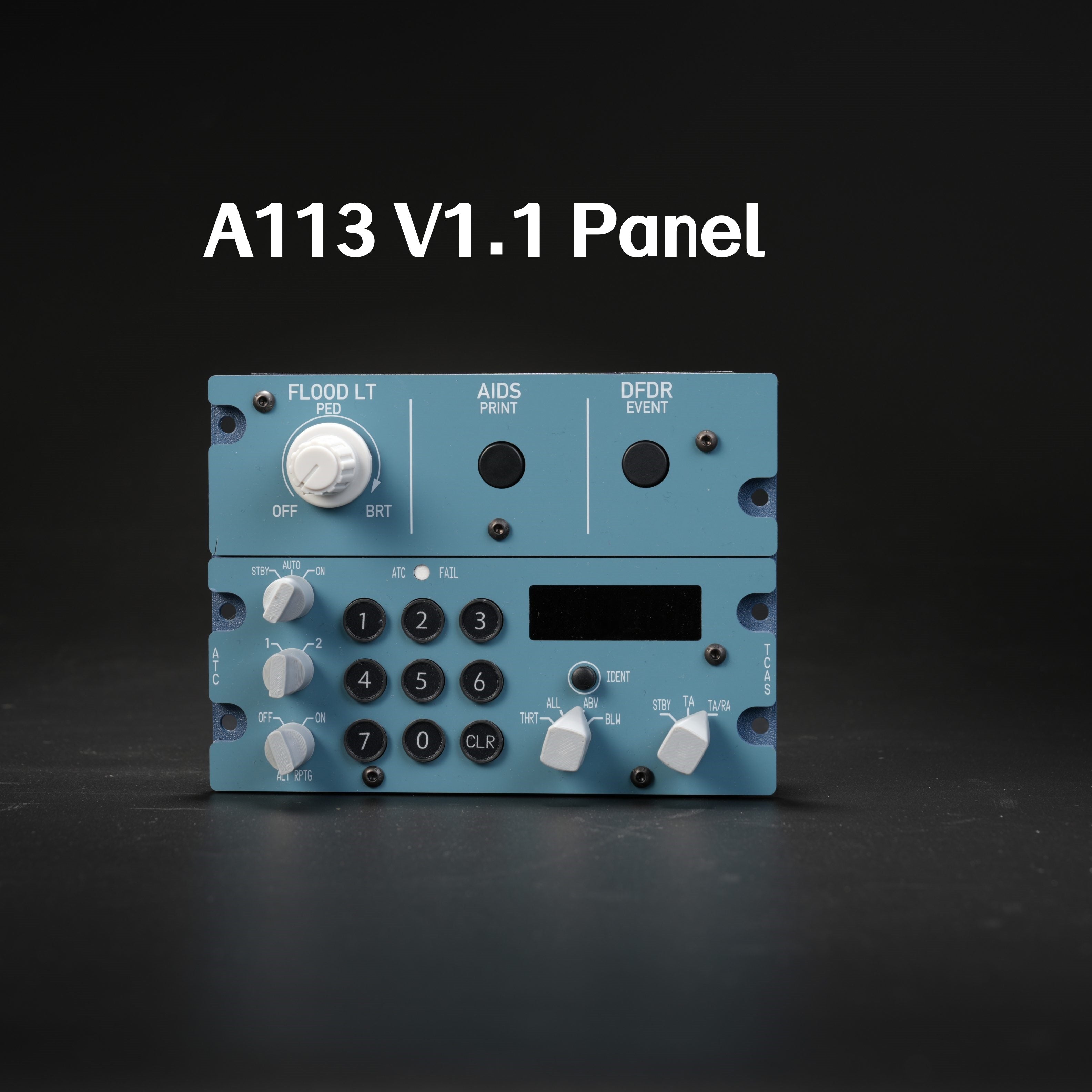
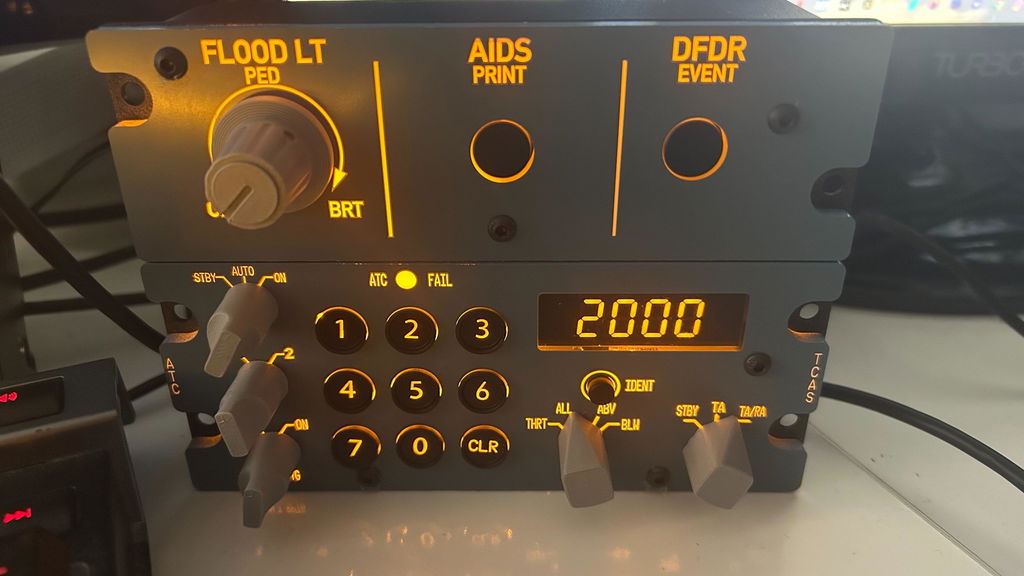
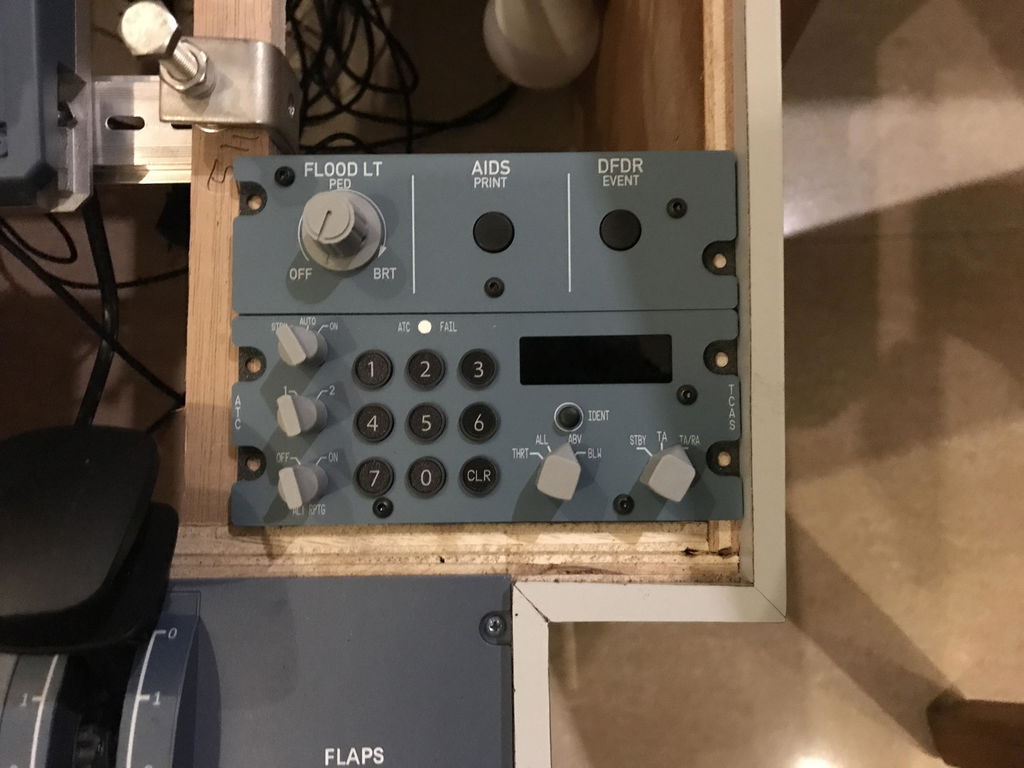
    Front view of the Rowsfire A113 A320 pedestal panel: FLOOD LT knob, AIDS PRINT and DFDR EVENT buttons, squawk keypad and TCAS switches
    Rowsfire A113 1:1 A320 ATC/TCAS, flood light and DFDR panel with the six-digit squawk display and backlit legends switched on
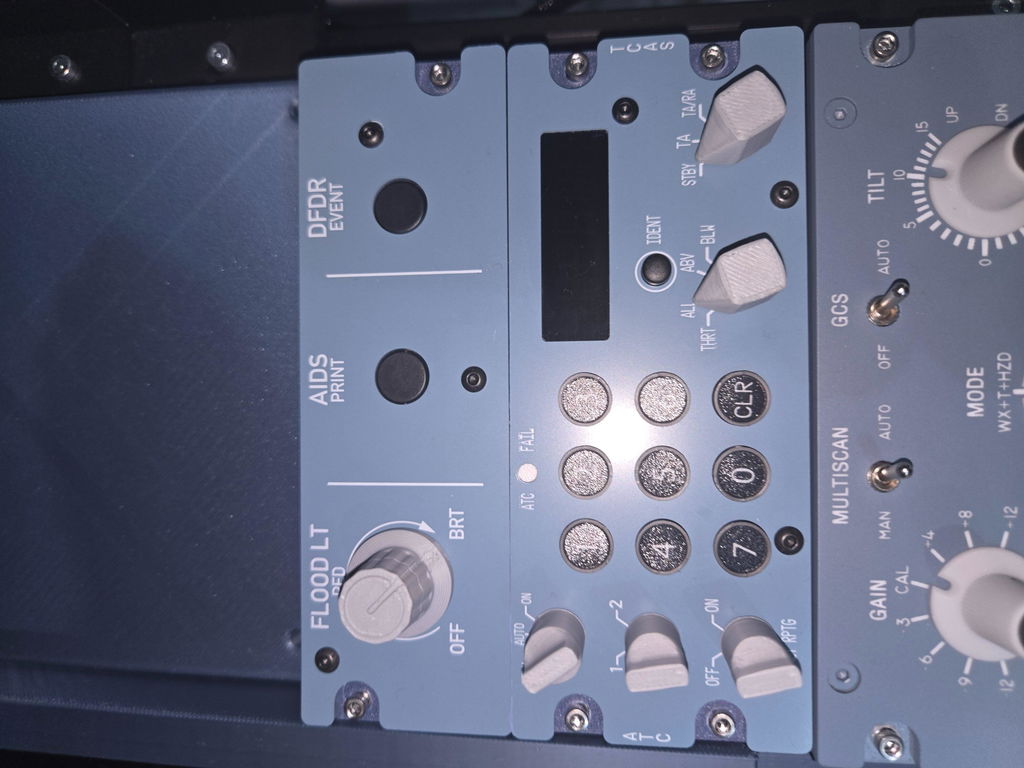
    Rowsfire A113 A320 ATC and TCAS panel seen at an angle, showing the aluminum housing
    Finger entering a squawk code on the Rowsfire A113 keypad, with the ATC FAIL light and FLOOD LT knob above
    Close-up of the A113 six-digit orange transponder display, IDENT button and TCAS traffic switch
    Hand turning the A113 TCAS traffic selector next to the TCAS mode switch
    Hand turning the A113 FLOOD LT PED knob between OFF and BRT
    Close-up of the A113 AIDS PRINT and DFDR EVENT push buttons
    A113 AIDS PRINT and DFDR EVENT buttons above the lit transponder display
    Close-up of the A113 FLOOD LT PED knob, ATC FAIL light and squawk keypad
    Hand adjusting the A113 FLOOD LT knob beside the AIDS PRINT button
    Side profile of the Rowsfire A113 showing the slim aluminum housing and rear USB-C cable
    Rowsfire A111, A112 and A113 A320 pedestal panels lined up side by side
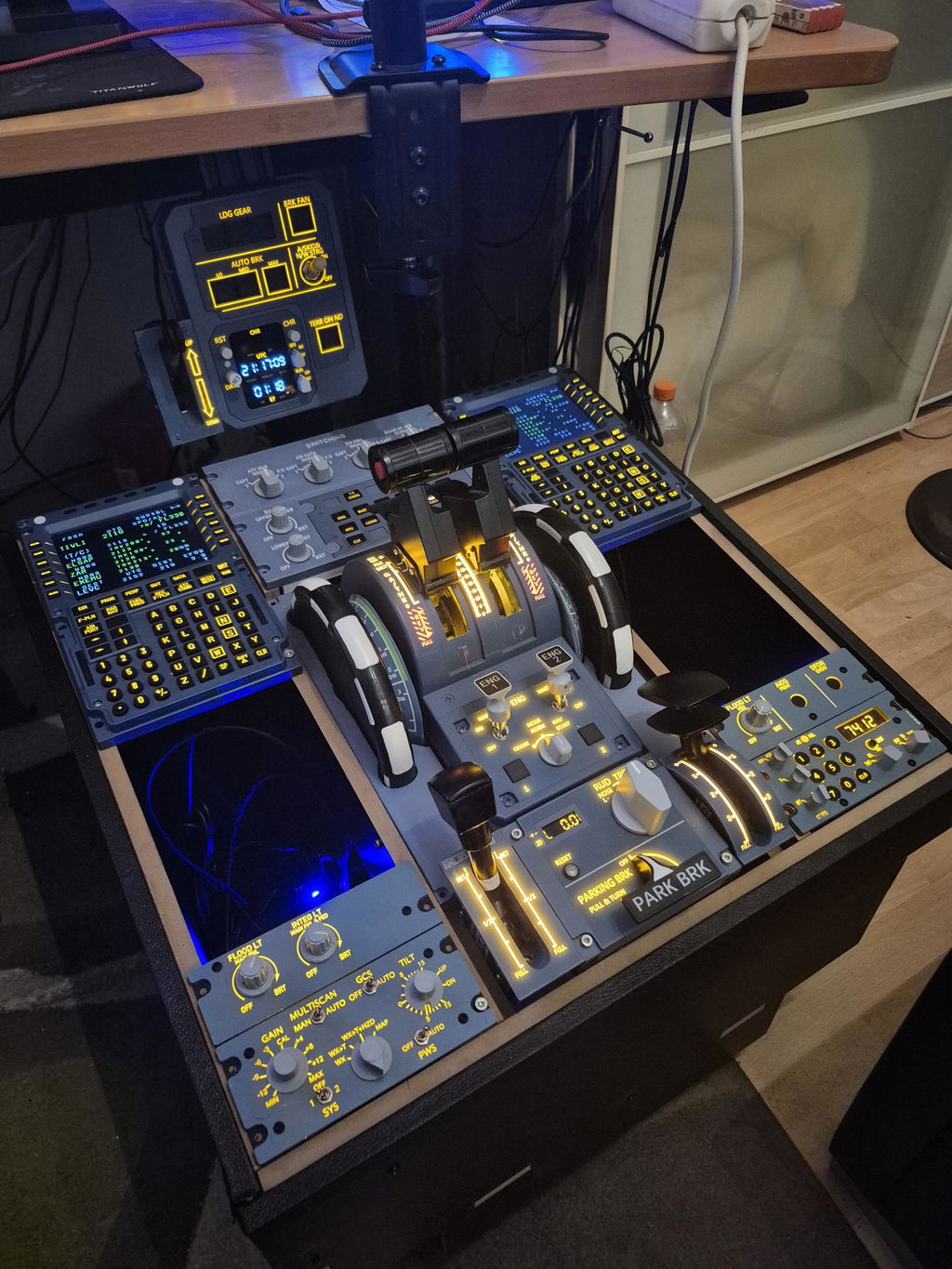
    Rowsfire A113 installed in an A320 home cockpit pedestal next to the thrust levers
    Close-up of the Rowsfire A113 fitted in a home cockpit pedestal
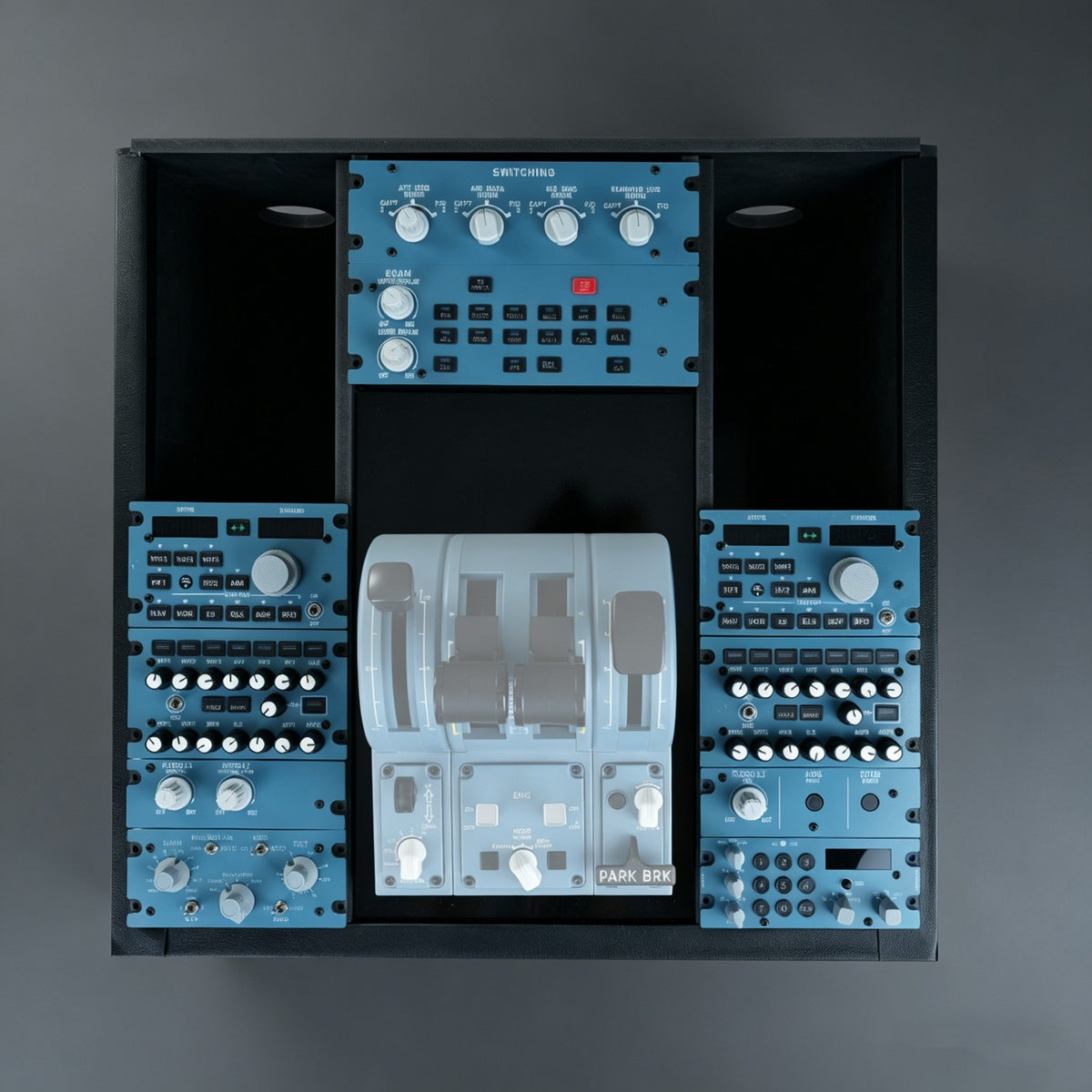
    A320 home cockpit pedestal built with Rowsfire A109, A111, A112 and A113 panels
    Rowsfire A113 A320 CKPT-LT + DFDR + ATC integrated panel retail box
    Rowsfire A113 retail box, angled view
    Rowsfire A113 retail box, top view
    Rowsfire A113 metallic gift box packaging
    Earlier Rowsfire A113 V1.1 panel, front view
    Rowsfire A113 A320 ATC/TCAS, flood light and DFDR panel with the squawk display and backlit legends switched on

    Airbus A320 Pedestal · ATC/TCAS + CKPT-LT + DFDR

    Transponder, TCAS and flood light, in one 1:1 panel.

    The A113 puts three A320 pedestal functions into one module: the ATC/TCAS transponder panel, the pedestal FLOOD LT knob, and the AIDS PRINT and DFDR EVENT buttons. Key in a squawk on the real-size keypad and watch it appear on the six-digit display. It drops straight into the Rowsfire A110P pedestal and connects with a single USB-C cable.

    • True 1:1 scale
    • Aluminum housing
    • Six-digit squawk display
    • Rear USB-C
    • Rowsfire App or MobiFlight

    Now shipping V2.0 · new V4.0 mainboard for a longer service life and finer adjustment.

    Watch it work

    See the A113 in action.

    An independent hands-on review, plus our own unboxing and App setup. Tap a chapter to jump straight to it.

    Easyjetsimpilot review · independent · 9 min

    The review covers the A113 together with the A111 radio panel. Opinions are the creator's own.

    Official unboxing · box to App setup

    What owners said

    "Incredible panel. Very easy to use and setup with Mobiflight for the Fenix A320 family."

    George Kanakis · Verified buyerRead reviews →

    "Very nice product and perfectly supplement my DIY pedestal."

    Verified buyerRead reviews →

    Why the A113

    Built like the real part.

    Finger entering a squawk code on the A113 keypad

    Squawk like the real thing

    • Real-size 0–7 keypad with CLR, so you set codes the way ATC gives them.
    • Six-digit orange display, IDENT button and ATC FAIL light.
    • ATC and TCAS mode switches, including the TCAS traffic selector.
    Close-up of the A113 AIDS PRINT and DFDR EVENT buttons

    Flood light and DFDR, built in

    • FLOOD LT PED knob, from OFF to BRT, for the pedestal lighting.
    • AIDS PRINT and DFDR EVENT push buttons in their real positions.
    • Three pedestal functions in one panel, so your build stays compact.
    Side profile of the A113 showing the slim aluminum housing

    Aluminum housing, V4.0 mainboard

    • Rugged aluminum alloy chassis with a tactile finish.
    • The V2.0 mainboard improves service life and adjustment precision.
    • USB-C on the back, so cables run cleanly behind the panel.
    Rowsfire A113 installed in an A320 home cockpit pedestal

    Made for the pedestal

    • Fits the Rowsfire A110P A320 pedestal frame natively.
    • Embedded rail-mount design, no VESA bracket needed.
    • Pairs with the A111, A112 and A109 for a complete center pedestal.

    Compatibility

    Works with the Airbus you fly.

    MSFS 2020, MSFS 2024 and X-Plane 12 on Windows 10 / 11.

    Aircraft (Rowsfire App)

    • FenixA320
    • FlyByWireA32NX
    • ToLissA320
    • iniBuildsA320neo V2

    The ToLiss A319 / A321 are supported on V1.0 / V1.1 only. The Airbus A330-300 and FSLabs are not supported yet. More aircraft are added through App updates. Full compatibility list →

    Two ways to connect

    Rowsfire App · plug and play. It's free, detects the A113 and loads the right profile for your aircraft.

    MobiFlight · fully customizable. Map any key, knob or switch yourself, including for aircraft the App doesn't cover yet.

    Quick start

    1. Install the Rowsfire App (free) and plug the A113 into a USB 3.0 port on the back of your PC.
    2. Start your simulator and load your aircraft first, then open the Rowsfire App.
    3. Fly. The App detects the A113 and loads the profile for your aircraft. If it asks for a version, pick the one on your panel's label (V2.0 or V1.0).
    ⚡ Running several panels? If the A111, A112 and A113 share one unpowered USB hub, the hub may not supply enough power and a panel can disconnect. Use separate USB ports on the back of your PC, or a powered hub such as the Rowsfire 13-Port Independent USB 3.0 Hub.

    Up close

    Every key where it should be.

    A113 six-digit transponder display and IDENT button lit up
    Hand turning the A113 TCAS traffic selector
    Hand turning the A113 FLOOD LT PED knob
    A113 AIDS PRINT and DFDR EVENT buttons above the lit display
    Rowsfire A113 seen at an angle, showing the aluminum housing
    Rowsfire A111, A112 and A113 pedestal panels side by side

    Specs

    The technical details.

    PanelAirbus A320 ATC/TCAS + pedestal flood light (CKPT-LT) + AIDS PRINT / DFDR EVENT, 1:1 scale
    VersionsV2.0 latest (V4.0 mainboard) · V1.0 previous version, US/EU stock while it lasts
    MaterialAluminum alloy housing, acrylic face, PLA, SMD circuit board
    SimulatorsMSFS 2020 / 2024 · X-Plane 12 (Windows 10 / 11)
    AircraftFenix A320 · FlyByWire A32NX · ToLiss A320 · iniBuilds A320neo V2 (V1.0 / V1.1 also: ToLiss A319 / A321)
    DriversRowsfire App or MobiFlight
    MountingRail-mount, fits the Rowsfire A110P pedestal (no VESA)
    ConnectionUSB Type-C (rear) · USB 3.0 port recommended
    Size10.7 × 14.5 × 3.7 cm
    Weight600 g (800 g packed)
    Age16+

    Package

    • Package size25 × 18 × 8.5 cm
    • Package weight800 g

    Setup takes one download: get the free Rowsfire App and plug in the panel.

    Rowsfire A113 A320 CKPT-LT + DFDR + ATC integrated panel retail box

    Buy with confidence

    Backed by Rowsfire.

    🛡️

    1-Year Warranty

    Free replacement for hardware defects

    🚚

    Free Shipping

    Worldwide · duties & taxes included

    ↩️

    30-Day Returns

    Return & exchange support

    💬

    Fast Remote Support

    95% of issues solved within 24h

    Common questions

    Questions, answered.

    What does the A113 control?

    Three A320 pedestal functions in one 1:1 module: the ATC/TCAS transponder panel (0–7 squawk keypad with CLR, six-digit display, IDENT, ATC FAIL light, ATC and TCAS mode switches), the pedestal FLOOD LT knob, and the AIDS PRINT and DFDR EVENT buttons.

    Which simulators and aircraft are supported?

    MSFS 2020, MSFS 2024 and X-Plane 12 on Windows 10 / 11.

    With the Rowsfire App: Fenix A320, FlyByWire A32NX, ToLiss A320 and the iniBuilds A320neo V2 (MSFS). V1.0 / V1.1 units also support the ToLiss A319 / A321. The Airbus A330-300 is not supported. FSLabs is not supported yet. See the full compatibility list.

    Which ToLiss aircraft does it work with?

    The ToLiss A320 in X-Plane 12 on every version, through the Rowsfire App. V1.0 / V1.1 units also work with the ToLiss A319 and A321. For other ToLiss models, you can map the panel yourself in MobiFlight. We add aircraft through App updates, so check the compatibility list for the latest.

    V2.0 or V1.0: which should I buy?

    V2.0 is the latest version. It uses the new V4.0 mainboard, which improves service life and adjustment precision, and ships from China (free standard shipping in 14–30 business days, or express in 5–13 for $29.99).

    V1.0 is the previous version. We have a small number left in our US/EU warehouse, so it ships in about 5 days and costs $10 less. It's fully supported by the Rowsfire App. Available while stock lasts.

    Do I need MobiFlight?

    No. Install the free Rowsfire App, plug in the panel and fly. MobiFlight is fully supported as a second option if you want custom mappings.

    A key or switch doesn't respond as expected. What should I do?

    First check that the version selected in the Rowsfire App matches the label on your panel (V2.0, V1.1 or V1.0). A mismatched version is the most common cause.

    Then load your aircraft before opening the App, and replug the USB cable. Still stuck? Email service@rowsfire.com and we'll walk you through it.

    Can I run the A111, A112 and A113 from one USB hub?

    Yes, but power matters. An unpowered hub may not supply enough power for several panels, and one can disconnect. Plug each panel into its own USB port on the back of your PC, or use a powered hub such as the Rowsfire 13-Port Independent USB 3.0 Hub, which has its own power adapter.

    How do I mount it?

    The A113 uses an embedded rail-mount design and fits the Rowsfire A110P A320 pedestal frame directly. No VESA bracket is needed.

    How long does shipping take?

    V2.0 ships from China: standard shipping is free and takes 14–30 business days, and express takes 5–13 business days for $29.99. V1.0 ships from our US/EU warehouse in about 5 days. Duties and taxes are included either way.

    What's your return and warranty policy?

    You get 30 days to return or exchange, and a 1-year warranty with free replacement for hardware defects. Missing accessories are reshipped.

    How do I get help with setup?

    Most issues are solved by updating the App or replugging the USB cable. For anything else, message us through live chat or email service@rowsfire.com. Our remote support team solves 95% of issues within 24 hours.

    Complete your pedestal

    Build your A320 center pedestal.

    Your A113 is already ticked. Add the frame and the panels you want, and we'll put them in your cart in one click. Multi-item discounts apply automatically at checkout.

    Rowsfire A110 A320 center pedestal fitted with A109, A111, A112 and A113 panels
    Tap a number to highlight the panelThrottle shown is not included
    Rowsfire A110P / A110 A320 Flight Simulator Pedestal Stand1
    A110 Pedestal Frame
    The frame that holds everything
    $299.99
    Rowsfire A109 A320 ECAM Panel — 1:1 Scale, Backlit2
    A109 ECAM Control Panel
    Top of the pedestal: ECAM switching
    $249.99
    Rowsfire A111 A320 Radio & Audio Panel (RMP/ACP) — 1:1 Scale3
    A111 Radio & Audio Panel (RMP/ACP)
    Captain & first officer sides: one per side
    $289.99
    Rowsfire A112 A320 Weather Radar & Cockpit Light Panel — 1:1 Scale4
    A112 Weather Radar & Cockpit Light Panel
    Lower left: WXR radar + cockpit lights
    $149.99
    Rowsfire A113 A320 ATC & Cockpit Light Panel (ATC) — 1:1 Scale5
    A113 ATC & Cockpit Light PanelTHIS ITEM
    Lower right: ATC transponder + cockpit lights
    $169.99
    0 items$0.00
    Multi-item discount (est.)−$0.00
    2 items · 13%3 items · 14%4+ items · 15%
    Estimated total$0.00

    Automatic checkout discounts: selected 15% offers keep the better rate and are not added on top of multi-item discounts. Free shipping and duties included to supported countries.

    • 5 stars: 18 (82%)
    • 4 stars: 3 (14%)
    • 3 stars: 1 (5%)
    • 2 stars: 0 (0%)
    • 1 star: 0 (0%)
    G
    George Kanakis

    Incredible Panel. Very easy to use and setup with Mobiflight for the Fenix A320 family. With a bit of trial and error, I have even managed to make my own custom Mobiflight profile for the FSLabs A321N, so if even a newbie like me who doesn't know much about Mobiflight can manage to configure this panel for a different aircraft, I think anyone can :)

    S
    Stefan Sjöstedt

    Very nice, easy to get going

    S
    STIEVENART

    Whaaaoouuu super merci pour votre matériel de très bonne qualité et qui rend la simulation à un niveau de réalité surprenante A107-108-111-112et113 nous emportent dans un réalisme stimulant et enivrant
    Merci pour votre matériel

    K
    Kdbniner72

    Très pratique pour l’immersion totale en simulation. Fonctionne nativement avec l’application rowsfire pour le Fenix sur msfs. Je recommande la gamme entière de panel rowsfire.

    Judge.me YouTube video placeholder
    A
    Anonymous

    the product was excellent but not yet to test

    D
    Davidvici

    Grundsätzlich macht es ein soliden Eindruck schön umgesetzt, mit der datei ist es auch einfach einzurichten, einen stern gibt es abzug weil der Transponder noch nicht so funktioniert wie es soll, ich kann es benutzen allerdings muss ich aufpassen, da sich beim Löschen des Squawk nicht Zahl für Zahl verschwindet, sondern die Zahl bleibt statisch bis ich wieder eine Zahl dazu drücke. Ansonsten wie gesagt funktionieren alle Schalter und leuchten tut auch alles.

    A
    Andreas

    Ich konnte es nur kurz anschließen für einen Test da ich ert am Aufbau von meinem Homecockpit bin , aber ich bin bis jetzt begeistert

    Hallo Andreas,

    Vielen Dank für Ihre Bewertung und Ihre Unterstützung!

    Es freut uns sehr zu hören, dass Sie bereits beim ersten Test von unserem A113 begeistert sind. Wir wünschen Ihnen viel Erfolg beim Aufbau Ihres Homecockpits und hoffen, dass unser Produkt Ihnen noch mehr Realismus und Freude beim Fliegen bringt.

    Vielen Dank nochmals für Ihr Vertrauen.

    G
    George

    So far this works good. Need it to work on other Toliss busses.

    Hi George, we're glad to hear it's working well! We'll keep your suggestion in mind for compatibility with other Toliss buses. Thanks for your feedback!

    A
    Anonymous

    Very nice product and perfectly supplement my DIY pedestal

    A
    Anonymous

    great product and easy to install

    A
    Anonymous

    Great product, price is reasonable. Works straight out of the box. Would certainly recommend

    P
    Pascal Fouraignan

    très bien

    F
    Filipe Vieira

    Parfect

    P
    Pedro

    The build quality of the A113 v1 panel is great and everything works as advertised with the Rowsfire app. The Flood Light dial is a little jittery.

    C
    Cem Türe

    The Rowsfire A113 Panel is great! I'm using it in MSFS 2024 with MobiFlight to control the Fenix. The build quality is excellent—I can definitely recommend it.

    W
    Wolfgang Nübel

    Good value for money and easy integration via Mobiflight

    D
    Diego R

    Great panel works as the real aircraft
    Very happy great Job guys

    J
    Joshia320

    Tolle Produkte, Ich werde noch viel mehr bestellen. Top Qualität

    S
    Stevehowe

    excellent addition to my console build really well made and my favourite of all the parts i have bought so far.just waiting for the app to be updated..:-)

    P
    Peet

    ATC FAIL light is white instead of red and always seems lit up due to the surrounding backlights

    A
    Anonymous

    5 Stars for your Item. Overall good product and I love 1:1 scale. The one and only, i would prefer a better quality of the Buttons and rotary swiches.
    But in all you are on the way.

    J
    JESUS PLAZA FLOREZ

    Aunque he tenido problemas con la configuración de mobyflight, hace unos minutos he conseguido que funcione perfectamente…con dos pequeños bugs que estoy seguro Rowsfire solucionará rápido

    P
    Pedro

    What is improved in version 2 of this panel?

    Rowsfire

    Hello, sir. This is mainly for the motherboard, aiming to enhance the overall lifespan and adjustment accuracy of the product.

    G
    George

    I wanted to buy some of your products but I realized that your software is not compatible with XP12. Is the rowsfite software going to be compatible with Xplane? Not talking Mobiflight. Just rowsfire.

    Rowsfire

    The ToLiss model will update its app around June 5 and will be compatible with the ToLiss aircraft model. If needed, you can place your order now so that it will be ready to use upon delivery.

    G
    Greg

    What is the actual width, and mounting hole spacing. Stated above the package is 25cm but the product dimension says 107 cm, can you clarify as I need to measure whether panels will fit my layout

    Rowsfire

    We would like to clarify that there was a typo in our previous description. The actual dimensions for the A113 are 10.7 × 14.5 × 3.7 cm (Length × Width × Height).

    The width is 14.5 cm, and the mounting hole spacing is designed to fit standard flight sim layouts. Please let us know if you need the exact millimeter measurements for the hole spacing, and we will be happy to provide them!

    Complete your A320 pedestal.

    In stock · free worldwide shipping · duties & tax included · 1-year warranty · 30-day returns